Still can't upload

pokey

Warrior Princess
11 Years
Joined
Jun 1, 2008
Messages
1,313
Reaction score
6
Points
171
Location
upstate
I read the through the tips but I still can't upload pics. I think something is wrong. When I go to upload a pic under my profile ino the choose file box does not allow me to click on it. And I have photos, uploads , avatars and defaults to upload to, but I can't get any photo to copy and paste even if I get it to upload to my albums. It's driving me crazy, and I already am crazy....... Please see in you can help. Thanks

 
Yes Pokey I've had the same problem since joining recently. But I think BYC had recently been hit by a surge of spammers and they shut the photo upload down to prevent the spam from overwhelming the site. Not sure when they will correct the matter and resume photo uploading.
 
Yes Pokey I've had the same problem since joining recently. But I think BYC had recently been hit by a surge of spammers and they shut the photo upload down to prevent the spam from overwhelming the site. Not sure when they will correct the matter and resume photo uploading.


Thank you for reaffirming my sanity
 
Is currently working here. Are you all checking the TERMS & CONDITIONS box - agreeing to post nothing egregiously unacceptable?

Nothing will happen if that box isn't checked.
 
Last edited:
Is currently working here. Are you all checking the TERMs & CONDITIONS box - agreeing to post nothing egregiously unacceptable?
Nothing will happen if that box isn't checked.


Yes I am but the choose file box does not highlight no matter what I do.and I have tried to copy and paste if I can get it to upload to the photo album but it won't copy over to the thread.are you guys mad at me? Lol
 
Hmmm... I just tried it and it worked fine. Let me get screenshots of all the steps and post them here in case your pages are missing something/different.

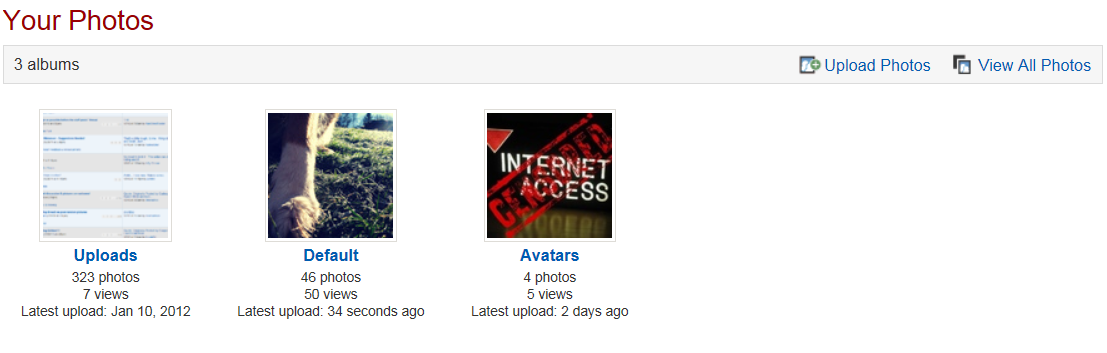
In my profile, I can either click the album I want to upload to or click "Upload photos."


If I choose the first one, I click this:


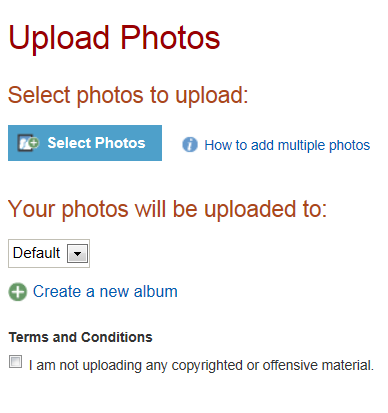
Both give me the upload screen:


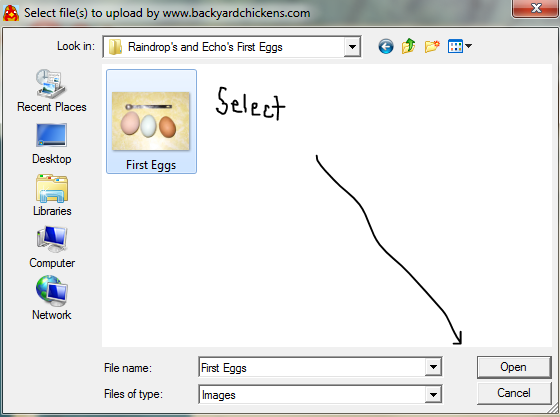
Then I click "Select photos" and choose my photo from my computer and then hit "Open."


The upload screen will now say that I have 1 file selected, so I check the Terms and Conditions box and hit "Upload" at the bottom right (not in the screenshot) and the file gets uploaded to my album.

Does this help your problem or are you missing something on your screen?
 
Hmmm... I just tried it and it worked fine. Let me get screenshots of all the steps and post them here in case your pages are missing something/different.

In my profile, I can either click the album I want to upload to or click "Upload photos."


If I choose the first one, I click this:


Both give me the upload screen:


Then I click "Select photos" and choose my photo from my computer and then hit "Open."


The upload screen will now say that I have 1 file selected, so I check the Terms and Conditions box and hit "Upload" at the bottom right (not in the screenshot) and the file gets uploaded to my album.

Does this help your problem or are you missing something on your screen?
. I am missing the second screen that doesn't pop up for me. And if I try to grab the URL and paste it in the box I get an error message. I am missing the box with the arrow drawn in it
 
Last edited:
One simple thing to double check...make sure that your pop up blocker isn't blocking pop ups on this site.
 
One simple thing to double check...make sure that your pop up blocker isn't blocking pop ups on this site.
Ok, I am using a iPad that has safari installed or either a droid incredible. I don't think either will allow pop ups. Is there a setting I can change in my acct settings to allow it?
 
Last edited:

New posts New threads Active threads

Back
Top Bottom